
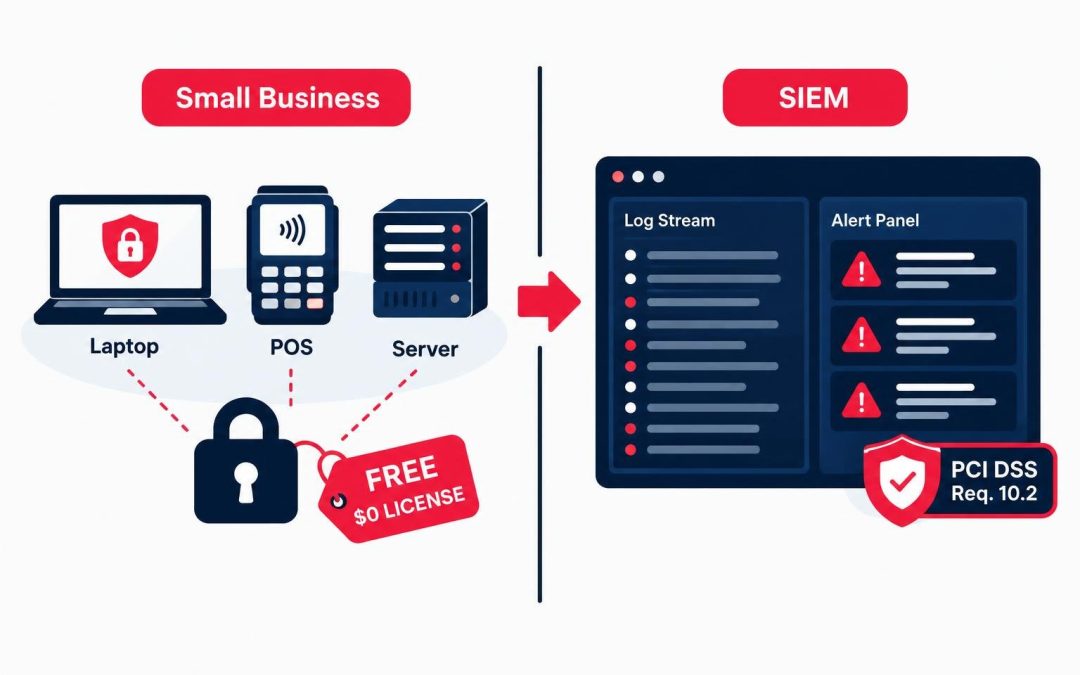
Small and mid-sized businesses that accept card payments are held to the same logging expectations as large enterprises — but rarely have the same budget. Commercial SIEM licenses, log retention add-ons, and per-endpoint agent fees can run into tens of thousands of dollars a year. For an SMB with a lean IT team, that cost is often the reason logging gets skipped, minimized, or handled with a spreadsheet nobody reviews.
That gap is a real compliance and security problem, not just a paperwork one. PCI DSS Requirement 10 exists precisely because breaches at smaller merchants are frequently discovered months after the fact — and only because someone finally looked at logs that were sitting there the whole time, unmonitored.
This article shows how one free, open-source SIEM — Wazuh — can help an SMB satisfy the specific text of PCI DSS Requirement 10.2 without a new line item in next year’s budget.
Why PCI DSS Requirement 10.2 Matters for SMBs
PCI DSS applies to any organization that stores, processes, or transmits cardholder data, regardless of size. Requirement 10 is titled "Log and monitor all access to system components and cardholder data," and its core sub-requirement, 10.2, states that audit logs must be implemented to support the detection of anomalies and suspicious activity, and the forensic analysis of events.
In plain terms: if something goes wrong, you need to be able to reconstruct exactly what happened, who did it, and when. Auditors don’t just want to see that logs exist — they want to see that the right events are captured, in enough detail, and retained long enough to investigate an incident.
For SMBs, this is usually the requirement that fails first during a PCI assessment. Firewalls get bought. Antivirus gets installed. Centralized, reviewable logging almost never does, because it’s perceived as an "enterprise" problem requiring an "enterprise" budget.
What Requirement 10.2 Actually Requires
PCI DSS v4.0 breaks Requirement 10.2 into specific event categories that must be logged (10.2.1.1 through 10.2.1.7). At a minimum, your logs need to capture:
- All individual user access to cardholder data
- All actions taken by any individual with administrative or root privileges
- Access to all audit trails/logs themselves
- Invalid logical access attempts
- Use of, and changes to, identification and authentication mechanisms (including creation of new accounts and elevation of privileges)
- Initialization, stopping, or pausing of audit logs
- Creation and deletion of system-level objects
That’s a specific, checkable list — not a vague instruction to "turn on logging." An auditor will ask you to produce evidence for each category. Native OS logs alone rarely cover all seven cleanly, and even when they technically do, nobody is centralizing or reviewing them.
Wazuh: A Free, Open-Source Answer
Wazuh is a free, open-source security monitoring platform that combines log collection, file integrity monitoring, and rule-based alerting. It’s built on the same lineage as OSSEC, with a modern manager/dashboard stack layered on top. There is no license fee for the core platform, and it runs on infrastructure you likely already have — a single mid-sized VM is enough for most SMB environments.
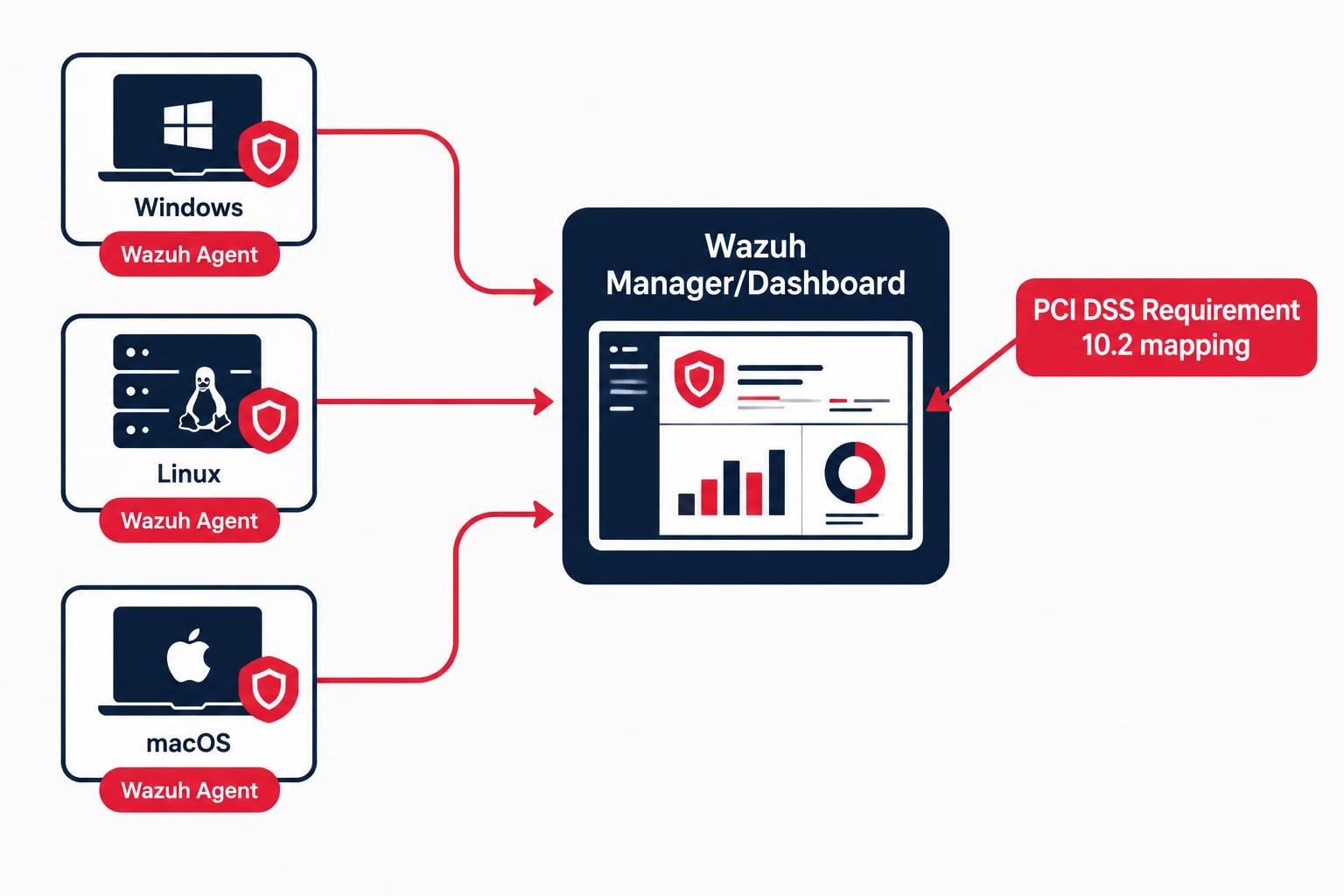
Wazuh works by deploying a lightweight agent to each endpoint or server you need to monitor (Windows, Linux, macOS). Agents forward logs and system events to a central Wazuh manager, which applies detection rules, correlates events, and stores everything for search and reporting through a web dashboard.
Critically for compliance purposes, Wazuh ships with a built-in PCI DSS compliance mapping module. It tags relevant rules and dashboard views against specific PCI DSS requirements out of the box, which materially reduces the manual work of proving coverage during an audit.
Open-source tools bring real cost benefits, but they also deserve the same scrutiny security teams apply to any software they deploy — see our broader take on open-source cybersecurity risk.
How Wazuh Maps to Requirement 10.2’s Sub-Requirements
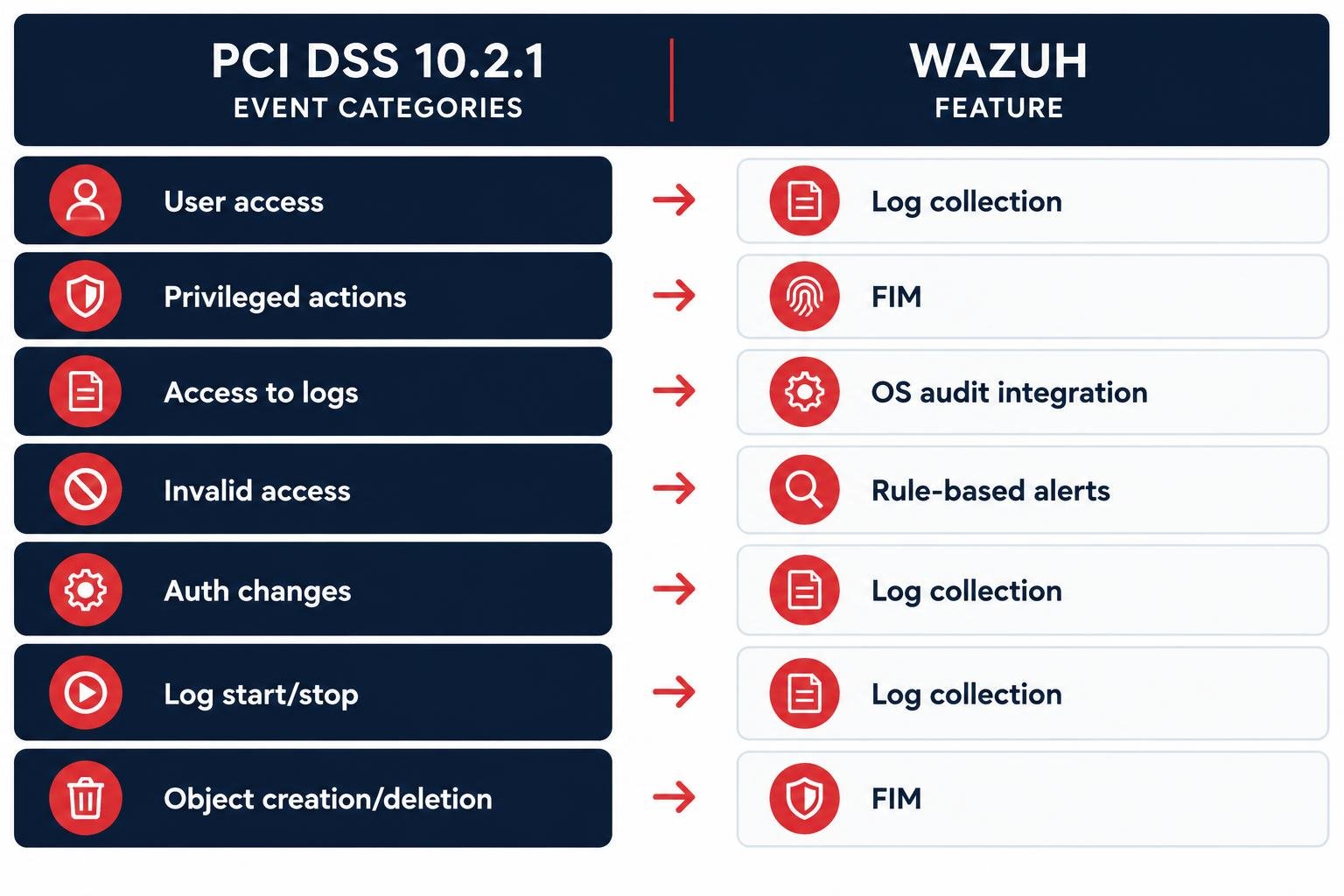
Here is how Wazuh’s default capabilities line up against the specific event categories in 10.2.1:
User Access to Cardholder Data
Wazuh collects authentication and application logs from the servers and databases handling card data, and can be configured to alert on access patterns outside the norm.
Privileged and Administrative Actions
Wazuh’s agent-based log collection captures sudo usage on Linux, admin group actions on Windows, and privileged command execution, feeding this into correlated alerts rather than a raw, unreadable log file.
Access to Audit Logs
Wazuh monitors its own log files and the underlying OS audit subsystems (auditd on Linux, Windows Security Event Log) for read/access events, satisfying the requirement that access to the logs themselves is logged.
Invalid Access Attempts
Failed logins, brute-force patterns, and repeated authentication failures are among Wazuh’s most mature out-of-the-box detection rules, generating real-time alerts rather than requiring manual log review.
Changes to Authentication Mechanisms
Account creation, password changes, group membership changes, and privilege escalation are tracked through Wazuh’s integration with native OS auditing tools.
Starting, Stopping, or Pausing Audit Logs
Wazuh’s File Integrity Monitoring (FIM) module can watch the audit configuration files and services themselves, alerting if logging is disabled or tampered with — a detail many commercial deployments overlook entirely.
Creation and Deletion of System-Level Objects
FIM again covers this, tracking file and directory creation/deletion on specified paths, which can be scoped to the systems that touch cardholder data.
Taken together, this is not a partial workaround — it’s a legitimate, evidenced path to satisfying the letter of Requirement 10.2 using software with a zero-dollar license cost.
Setting It Up: A Budget-Friendly Rollout Plan
A realistic SMB rollout does not require a dedicated security engineer. A phased approach keeps the project manageable:
Week 1 — Deploy the Manager
Stand up the Wazuh manager and dashboard on a single VM (cloud or on-premises). Sizing for a small cardholder data environment (a handful of servers plus a POS backend) is modest — resource requirements scale with log volume, not headcount.
Week 2 — Agent Rollout on In-Scope Systems
Install Wazuh agents on every server, database, and endpoint that stores, processes, or transmits cardholder data — this is your PCI DSS "scope," and it should already be documented from your last assessment or gap analysis.
Week 3 — Enable the PCI DSS Compliance Module and Tune Rules
Turn on the built-in compliance dashboard, review which 10.2.1 event categories are already firing alerts, and adjust rule thresholds to cut noise (an under-tuned SIEM that floods your inbox gets ignored, which defeats the purpose).
Week 4 — Set Retention and Assign Review Responsibility
Configure log storage to meet your retention policy (PCI DSS requires at least 12 months of audit log history, with the most recent 3 months immediately available for analysis under Requirement 10.5.1). Assign a named person — even part-time — to review dashboard alerts on a defined cadence.
Document each step as you go. Auditors will ask for evidence of the process, not just the tool.
Beyond Logging: Other Free Wins Wazuh Delivers
Requirement 10.2 is the anchor for this article, but Wazuh’s footprint extends further into PCI DSS territory at no extra cost. File Integrity Monitoring supports Requirement 11.5 (detecting unauthorized changes). Vulnerability detection modules support the spirit of Requirement 11.3. And centralized alerting on configuration changes helps evidence Requirement 1 and 2 controls around secure configurations.
The same discipline — evidenced, checkable controls rather than a policy binder — applies across broader compliance frameworks; see how ISO 27001 implementation follows a similar pattern.
None of this replaces a full compliance program, but it means the same deployment effort pays off across multiple requirements — a meaningful multiplier for a resource-constrained team.
Limitations and What Wazuh Won’t Do
Wazuh is not a substitute for a Qualified Security Assessor’s judgment, and it will not write your policies, run your risk assessments, or manage your quarterly access reviews. It also requires genuine care and feeding: rule tuning, agent maintenance, and dashboard review need to actually happen, or the deployment becomes shelfware that looks good in a screenshot but produces no real detection value.
For the broader compliance program — policies, risk assessments, QSA liaison — many SMBs pair a Wazuh deployment with dedicated PCI DSS Compliance services.
Storage planning matters too. Twelve months of retained logs across even a modest SMB environment can add up; budget for disk space even though you’re not budgeting for licenses.
Finally, Wazuh gives you the logging and alerting infrastructure — it does not replace the human process of reviewing alerts and acting on them, which auditors will also expect to see evidenced.
Takeaway
PCI DSS Requirement 10.2 is specific, checkable, and one of the most commonly failed controls for smaller merchants — not because the requirement is unreasonable, but because commercial logging tools price SMBs out. Wazuh closes that gap: it’s free, it maps directly to each of the seven event categories under 10.2.1, and it ships with a built-in PCI DSS compliance view that turns raw logs into audit-ready evidence.
The tool itself won’t finish the job. Scoping your environment correctly, tuning rules, setting retention, and assigning someone to actually review the alerts are the parts that make the difference between "installed" and "compliant." Wazuh handles the logging; building out the rest of a sustainable compliance program is its own discipline — see why GRC is becoming the operating system for business trust. But for an SMB weighing a five-figure SIEM license against a weekend of configuration work, Wazuh is the clearest budget-friendly path to real Requirement 10.2 coverage available today.